In today’s eCommerce-driven world, simply displaying products on your website is not enough. Customers want inspiration, social proof, and a seamless shopping experience. That’s where a shoppable Instagram feed comes in.
By integrating Instagram with your website and making it shoppable, you can turn engaging social content into a direct sales channel. In this guide, you’ll learn how to add shoppable Instagram feed to your website, why it matters, and how to do it step by step.
What is a Shoppable Instagram Feed?
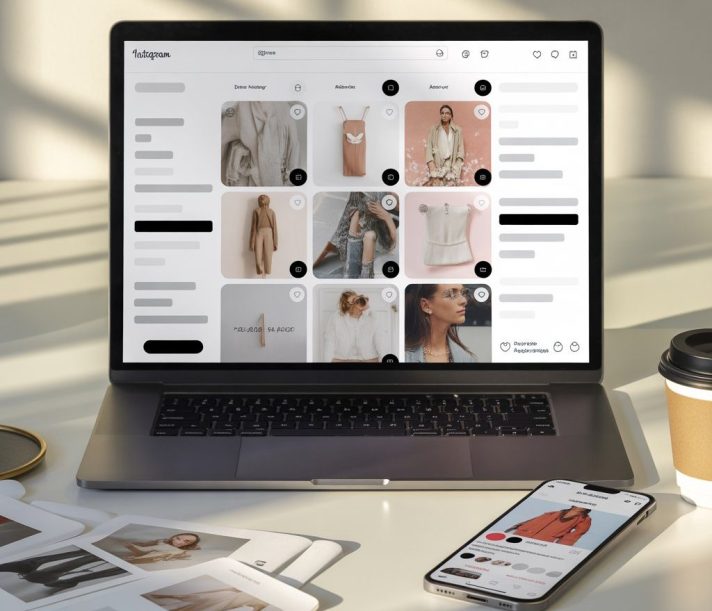
A shoppable Instagram feed is a curated display of your Instagram content where each post is linked to a product or landing page. Instead of just viewing images, users can click on posts and directly purchase the featured products.
This transforms your Instagram content into an interactive storefront embedded within your website.
Why Add a Shoppable Instagram Feed to Your Website?
1. Turn Inspiration into Instant Purchases
Visitors can discover products through real-life visuals and buy them instantly without searching manually.
2. Boost Conversions with Social Proof
User-generated content and real customer photos increase trust and influence buying decisions.
3. Enhance User Experience
A shoppable feed creates a smooth journey from discovery to checkout.
4. Increase Engagement
Interactive Instagram content keeps users on your site longer and encourages exploration.
Key Features of a Shoppable Instagram Feed
Before you start, here are some features to look for:
- Clickable Instagram posts
- Product tagging functionality
- Customizable layouts (grid, carousel, gallery)
- Real-time content updates
- Mobile responsiveness
- Analytics and performance tracking
Step-by-Step: How to Add Shoppable Instagram Feed to Your Website
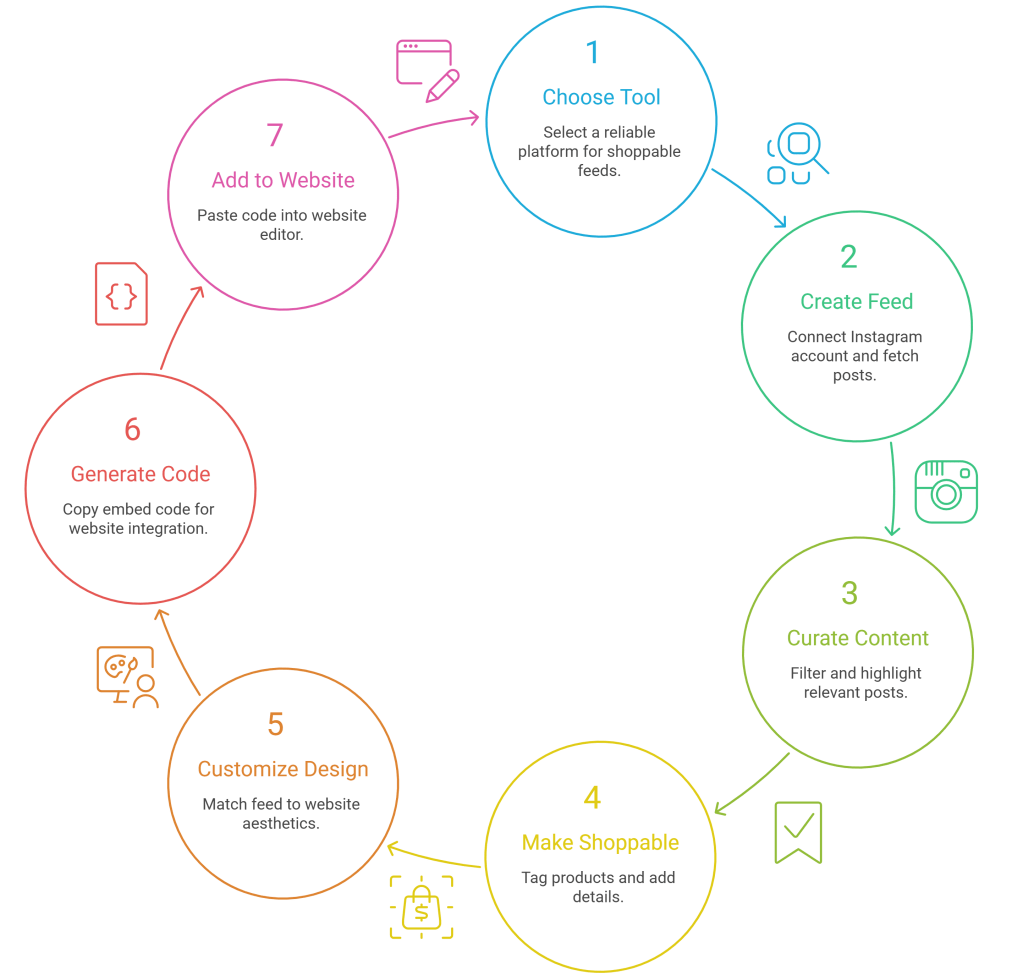
Here’s a complete process based on how platforms like Taggbox work:
Step 1: Choose a Shoppable Instagram Feed Tool
Start by selecting a reliable instagram feed widget tool that supports shoppable feeds. Tools like Taggbox are designed to help you collect, curate, and make Instagram content shoppable without coding.
Step 2: Create Your Instagram Feed
Once you sign up:
- Connect your Instagram account
- Choose your feed type (profile, hashtag, mentions, etc.)
- Fetch your Instagram posts automatically
This step helps you gather all the content you want to display on your website.
Step 3: Curate and Moderate Content
Not every post needs to be displayed. Use moderation features to:
- Filter out irrelevant content
- Highlight high-quality visuals
- Showcase user-generated content
This ensures your feed aligns with your brand image.
Step 4: Make Your Feed Shoppable
This is the most important step.
- Select posts you want to make shoppable
- Tag products to each post
- Add product URLs, pricing, or CTA buttons
Now, when users click on a post, they can directly view or purchase the product.
Step 5: Customize Your Feed Design
Match your feed with your website’s design by:
- Choosing layouts (grid, slider, carousel)
- Adjusting colors, fonts, and spacing
- Adding hover effects or CTAs
A well-designed feed improves both engagement and conversions.
Step 6: Generate Embed Code
After customization:
- Click on “Publish”
- Copy the embed code provided by the platform
This code will be used to display your feed on your website.
Step 7: Add the Feed to Your Website
Depending on your platform (Wix, Shopify, WordPress, Shopware, etc.):
- Open your website editor
- Add an HTML/embed code block
- Paste the code
- Save and publish
Your shoppable Instagram feed is now live on your website.
Best Practices for Shoppable Instagram Feeds
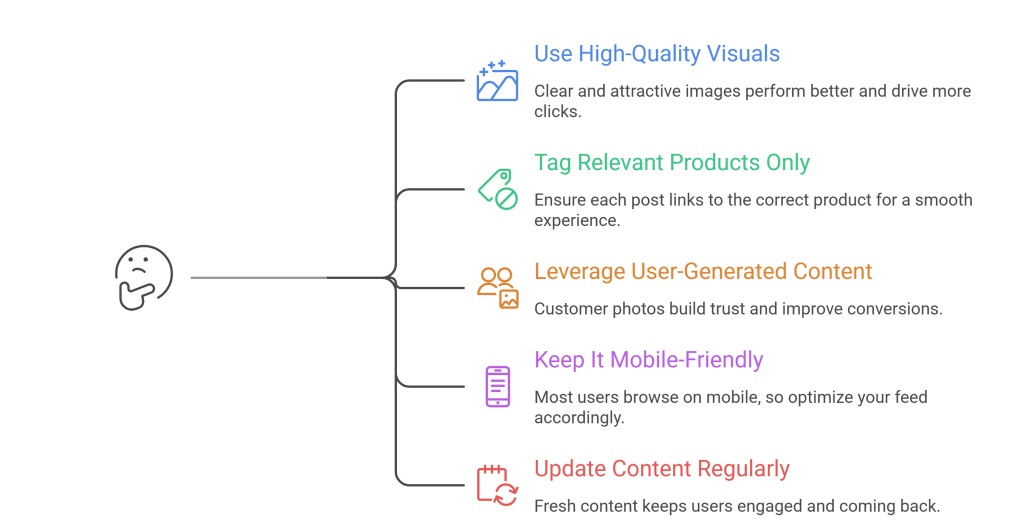
To maximize results, follow these tips:
Use High-Quality Visuals
Clear and attractive images perform better and drive more clicks.
Tag Relevant Products Only
Ensure each post links to the correct product for a smooth experience.
Leverage User-Generated Content
Customer photos build trust and improve conversions.
Keep It Mobile-Friendly
Most users browse on mobile, so optimize your feed accordingly.
Update Content Regularly
Fresh content keeps users engaged and coming back.
Where to Place Shoppable Instagram Feed on Your Website
Strategic placement can improve performance:
- Homepage (for instant engagement)
- Product pages (to show real-life usage)
- Category pages (for inspiration)
- Dedicated gallery page (for full browsing experience)
Common Mistakes to Avoid
When adding a shoppable Instagram feed, avoid:
- Overloading the page with too many posts
- Not optimizing for mobile devices
- Linking to incorrect or broken product pages
- Ignoring content moderation
- Using low-quality images
Final Thoughts
A shoppable Instagram feed is more than just a design element—it’s a powerful sales tool. By following the right steps and using a reliable platform, you can easily add a shoppable Instagram feed to your website and turn social engagement into real revenue.
If done correctly, it not only enhances your website’s visual appeal but also creates a seamless shopping experience that today’s users expect.

 Social Wall